
The Ricoh ScanSnap iX2500 is the best document scanner for home use if you want speed, a 100-sheet feeder, and a touchscreen that skips the need for separate scanning software. It isn’t the only right answer, though. A household mostly digitizing photos needs a flatbed, not a feeder. A desk that barely fits a keyboard needs something smaller than any of the scanners built for volume.
That’s the real problem with most scanner buying guides: they treat “best” as a single answer instead of a decision that depends on how much paper you’re actually feeding it. A parent scanning school forms once a week has different needs than someone clearing out a decade of tax records in one weekend.
This guide covers six scanners built for different versions of that job: two fast sheetfed models, one built for daily office-style volume, one compact wireless option, one ultra-portable model, and one flatbed for anything a feeder can’t handle. Each pick includes verified dimensions, warranty terms, and what actually ships in the box.
Affiliate disclosure: SmartVentureHub may earn a commission if you buy through links on this page, at no extra cost to you.
Our Top Picks at a Glance
| Award | Product | ADF Capacity | Price Range | Deciding Factor |
|---|---|---|---|---|
| Best Overall | Ricoh ScanSnap iX2500 | 100 sheets | $400 – $470 | 5-inch touchscreen with Wi-Fi and cloud scanning |
| Best Value | Ricoh ScanSnap iX2400 | 100 sheets | $350 – $400 | Same 45 ppm speed as the flagship, USB only |
| Best for High-Volume Use | Epson DS-530 II | 50 sheets | $380 – $430 | Rated for a 4,000-sheet daily duty cycle |
| Best Compact Wireless | Brother ADS-1800W | 20 sheets | $260 – $330 | 3.1 lb footprint with a 2.8″ touchscreen |
| Best Ultra-Portable | Epson WorkForce ES-50 | 1 sheet (manual) | $120 – $170 | 0.59 lb, powered entirely through the USB cable |
| Best Flatbed for Photos & Books | Canon CanoScan LiDE 300 | Flatbed, no ADF | $70 – $100 | 2400 dpi optical resolution for photos and books |
Do You Need an ADF or a Flatbed Scanner?
You need an ADF (automatic document feeder) if you’re scanning loose, single sheets like bills, receipts, or contracts. You need a flatbed if you’re scanning photos, pages from a bound book, or anything too fragile or oddly shaped to feed through rollers.
An ADF loads a stack and pulls each page through automatically, which is what makes a scanner fast enough to clear a year of paperwork in one sitting. It can’t handle a photo without risking a crease or a jam, and it can’t scan a page still bound inside a book.
A flatbed lays the item flat under a glass sensor, one page or photo at a time. That’s slower for stacks of paper but it’s the only safe option for anything you can’t run through rollers. If your paper clutter is mostly bills and forms, buy an ADF scanner. If it’s a shoebox of old family photos, the Canon CanoScan LiDE 300 below is the pick that actually fits the job.
How Many Sheets Per Minute Do You Actually Need?
Most households do fine with 25 to 35 pages per minute, the range covered by the Brother ADS-1800W and Epson DS-530 II. Anything faster mostly saves time on the rare weekend you’re clearing out a whole filing cabinet at once.
Speed matters less than sheet capacity for most people. A 20-sheet feeder that clears a stack in a few minutes beats a machine you have to babysit every 10 pages, even if the second one’s per-page speed is faster on paper. The Ricoh ScanSnap lineup keeps the same 45 ppm duplex speed and 100-sheet feeder across both its current models, so the real choice between the iX2500 and iX2400 comes down to the touchscreen and Wi-Fi, not raw speed.
If you’re scanning fewer than 20 pages in a typical week, the extra ADF capacity of the office-oriented picks buys you very little. That’s where a compact or ultra-portable model earns its spot on this list instead of just being a downgrade.
Ricoh ScanSnap iX2500 – Best Overall

| Feature | Specification Details |
|---|---|
| Physical Dimensions | 6.3 in W x 11.5 in D x 6.3 in H (closed), 7.7 lbs |
| Warranty Length | 1 year limited, parts and labor (the Premium Bundle variant ships with a 4-year depot warranty instead) |
| Box Contents | Not published by manufacturer as a single itemized list |
| ADF Capacity | 100 sheets, 45 ppm / 90 ipm duplex |
The ScanSnap iX2500 is a duplex sheetfed scanner built to replace a filing cabinet, not just tidy one up. It’s Ricoh’s current flagship, and it’s the model to buy if you want to stop thinking about scanning software entirely.
The 5-inch color touchscreen runs the whole job. You pick a saved profile (tax documents, receipts, photos) and tap scan, no separate app window on your computer required. Wi-Fi and USB-C both work, so it can sit across the room from your desk and still send files straight to a folder or cloud account.
At 100 sheets, the feeder clears a stack of mixed paper sizes without a reload, and 45 ppm duplex means a 50-page double-sided document takes about a minute. The card slot handles driver’s licenses and ID cards without the fumbling a plain sheet feeder causes.
The tradeoff is size and price. This isn’t a scanner you tuck into a drawer between uses, and it costs more than any other pick on this list.
Pros
Cons
Buy This If: you’re digitizing years of backlogged paperwork and want a touchscreen that skips the desktop software entirely.
Skip This If: you scan fewer than a dozen pages a week; the speed and capacity here go mostly unused.
Ricoh ScanSnap iX2400 – Best Value

| Feature | Specification Details |
|---|---|
| Physical Dimensions | 11.5 in W x 6.3 in D, height not published by manufacturer, 7.1 lbs |
| Warranty Length | 1 year limited, parts and labor |
| Box Contents | Not published by manufacturer as a single itemized list |
| ADF Capacity | 100 sheets, 45 ppm / 90 ipm duplex |
The ScanSnap iX2400 scans at the exact same speed as the pricier iX2500, with the same 100-sheet feeder. What it drops is the touchscreen and Wi-Fi, replaced by a single one-touch scan button and a USB-C-only connection.
That trade saves real money over the flagship, and for most households it’s the right one. If your scanner lives next to your computer anyway, a touchscreen you rarely tap doesn’t earn its price. One button that starts a scan and drops a searchable PDF into a folder is enough.
This is Ricoh’s direct replacement for the older iX1400, which is now discontinued. Anyone who was eyeing the iX1400 based on an older review should look at the iX2400 instead; it’s the current model carrying that same simple, no-frills design forward.
Pros
Cons
Buy This If: your scanner sits next to your computer and you don’t need Wi-Fi or a touchscreen to justify the extra cost.
Skip This If: you want to scan from across the room or trigger saved profiles without opening software on your computer.
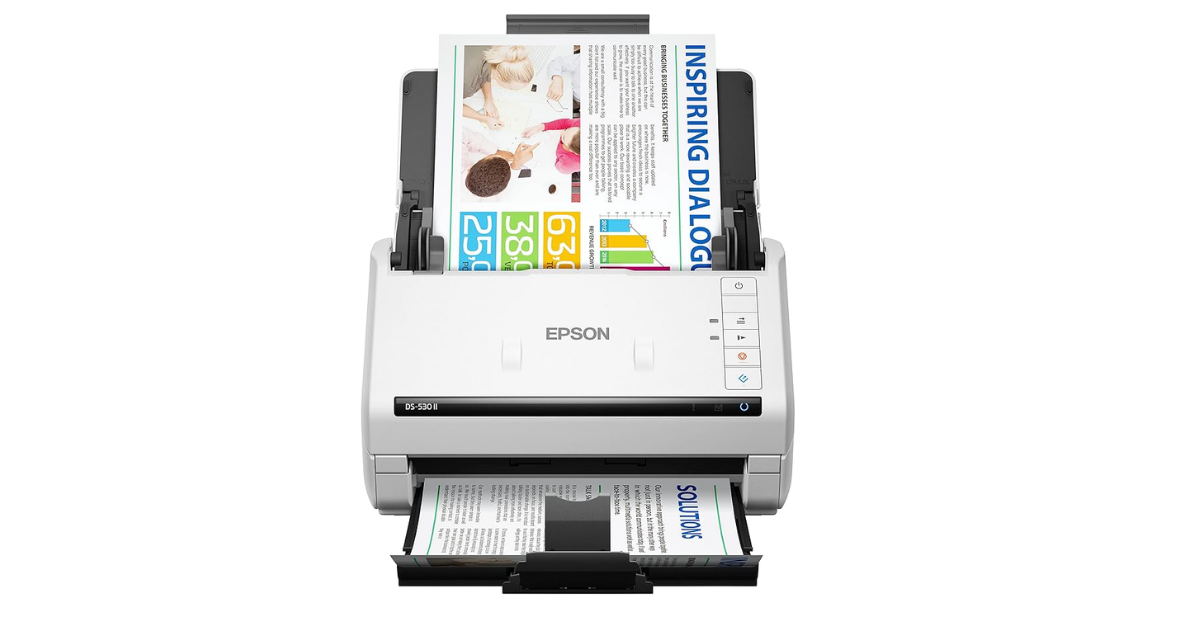
Epson DS-530 II – Best for High-Volume Home Office Use

| Feature | Specification Details |
|---|---|
| Physical Dimensions | 6.6 in W x 11.6 in D x 6.9 in H, 8.1 lbs |
| Warranty Length | 3-year limited warranty with Advance Exchange (free next-business-day replacement) |
| Box Contents | DS-530 II scanner, Start Here poster, SuperSpeed USB cable, AC adapter and power cable |
| ADF Capacity | 50 sheets, 35 ppm / 70 ipm duplex |
The Epson DS-530 II is rated for a 4,000-sheet daily duty cycle, more than double what the ScanSnap models are built to sustain day after day.
That duty cycle matters if you’re running a side business from home, managing paperwork for aging parents, or digitizing a genuinely large backlog on a tight timeline. The 50-sheet feeder is smaller than the ScanSnap picks, but Advanced paper handling (blank page removal, auto rotation, dirt detection, double-feed detection) keeps mixed stacks moving without constant babysitting.
The 3-year limited warranty with Advance Exchange is the longest coverage on this list by two years, and it comes with free next-business-day replacement if something breaks. TWAIN and ISIS drivers mean it plugs into existing document management software instead of forcing you onto a single app.
Pros
Cons
Buy This If: you’re scanning for a home-based business or a genuinely heavy, ongoing paper volume and want the longest warranty here.
Skip This If: you want Wi-Fi scanning or a feeder that holds more than 50 sheets at once.
Brother ADS-1800W – Best Compact Wireless

| Feature | Specification Details |
|---|---|
| Physical Dimensions | 11.3 in W x 4.0 in D x 3.3 in H, 3.1 lbs |
| Warranty Length | 1 year limited |
| Box Contents | Not published by manufacturer as a single itemized list |
| ADF Capacity | 20 sheets, 30 ppm single-pass duplex |
The Brother ADS-1800W is built for a desk that doesn’t have room for a full-size scanner. At 3.1 lbs and a footprint smaller than a hardcover book, it’s the smallest wireless duplex scanner on this list, and the 2.8-inch color touchscreen still supports one-touch shortcuts to a cloud folder, email, or USB drive.
This is Brother’s current model, replacing the older ADS-1700W with a faster 30 ppm scan speed at a lower price than its predecessor launched at. The 20-sheet feeder is the smallest ADF capacity here, which is the right tradeoff for someone scanning a handful of documents a day rather than a filing cabinet’s backlog.
Wi-Fi, USB, and mobile scanning are all supported, and the touchscreen means you rarely need to open a computer at all to start a job.
Pros
Cons
Buy This If: your desk space is limited and you scan small batches of documents regularly rather than large backlogs.
Skip This If: you need to clear more than 20 sheets at a time without reloading the feeder.
Epson WorkForce ES-50 – Best Ultra-Portable

| Feature | Specification Details |
|---|---|
| Physical Dimensions | 10.7 in W x 1.9 in D x 1.4 in H, 0.59 lbs (product only) |
| Warranty Length | 1 year limited (US and Canada) |
| Box Contents | ES-50 scanner, USB cable, user guide |
| ADF Capacity | 1 sheet, manual feed, 10 ppm at 300 dpi |
The Epson WorkForce ES-50 weighs less than a smartphone and needs no power cord at all; it draws everything it needs through the USB cable connected to your laptop.
There’s no feeder to load here. You feed one page at a time, and a single sheet scans in about 5.5 seconds at default settings. That’s slower than any ADF pick on this list for a whole stack, but it’s the only scanner here that fits in a laptop bag without noticing the extra weight.
This is the pick for someone who scans occasionally, not daily: a receipt after a business trip, a signed form before mailing the original, a single document a week. Nuance OCR software is included, so single-page scans still come out as searchable PDFs.
Pros
Cons
Buy This If: you scan occasionally and want something light enough to travel with, not a desk-bound workhorse.
Skip This If: you have more than a few pages to scan in a typical sitting; the manual single-sheet feed becomes tedious fast.
Canon CanoScan LiDE 300 – Best Flatbed for Photos & Books

| Feature | Specification Details |
|---|---|
| Physical Dimensions | 14.5 in W x 9.9 in D x 1.7 in H, 3.6 lbs |
| Warranty Length | 1 year limited, parts and labor |
| Box Contents | CanoScan LiDE 300 scanner, Setup CD, USB 2.0 cable (A to Mini-B) |
| ADF Capacity | Flatbed only, no ADF; one page at a time, about 10 seconds per scan |
The Canon CanoScan LiDE 300 is a flatbed scanner, not a sheet feeder, built for photos, bound pages, and anything too delicate to risk in rollers.
Its 2400 x 2400 dpi optical resolution captures far more detail than any ADF scanner here, which matters when you’re digitizing a shoebox of family photos rather than a stack of bills. The Z-lid extension top lifts to fit a thick book spine, so you can scan a page without cracking the binding flat.
At 1.7 inches tall and drawing power entirely through USB, it’s slim enough to store flat in a drawer between uses. It’s slower than any feeder-based scanner for stacks of loose paper, which is the tradeoff for image quality on anything a feeder can’t safely handle.
Pros
Cons
Buy This If: you’re digitizing photos, books, or anything too delicate or oddly shaped for a sheet feeder.
Skip This If: your paper clutter is mostly loose bills and forms; an ADF scanner will clear that stack far faster.
What Happens to the Paper After You Scan It?
Most of it gets shredded, some of it gets filed, and a small category stays as a physical original no matter how good the scan is. Sorting paper into those three buckets before you scan saves you from re-handling the same stack twice.
Bills, statements, and anything with an account number is safe to shred once it’s scanned and backed up. The FTC’s own shredding guidance treats most routine paperwork as safe to destroy well before the multi-year windows people assume apply to everything. A cross-cut home shredder is the safer disposal method over tossing account numbers straight into recycling.
Tax returns are the exception worth planning around. The IRS generally recommends keeping records for at least three years after filing, longer if you’ve underreported income or claimed a bad debt loss. Scan the current year plus the two or three before it, and keep them in a clearly labeled folder as part of a home filing system rather than a loose pile of PDFs with no structure.
A handful of documents should stay physical regardless of how good your scanner is: birth certificates, passports, property deeds, and Social Security cards. Some agencies only accept the original, not a scan. Keep those in a fireproof document box even after you’ve digitized a copy for backup.
If you’re mid-project and papers are piling up faster than you can scan them, an accordion folder or expanding file is a better staging spot than a loose stack on the counter. Sort by month or category as things come in, then work through the folder in scanning sessions instead of letting the pile grow. That habit is most of what it takes to reduce paper clutter for good, and it pairs naturally with the broader project of going paperless at home.
Products We Considered But Didn’t Include (And Why)
ScanSnap iX1400 and iX1600. Both were solid scanners in their day, and you’ll still see them recommended in older reviews. Ricoh’s own product pages now list the iX1400 and iX1600 as discontinued, replaced by the iX2400 and iX2500 covered above. Buying old stock of a discontinued model means shorter remaining support and driver updates than the current generation.
Brother ADS-1700W. This was our compact wireless pick until we checked Brother’s own spec page against its replacement. The ADS-1800W scans faster, costs less at MSRP, and is the model Brother is actively selling forward. Recommending the 1700W would point readers to the slower, pricier option instead of its own direct upgrade.
Frequently Asked Questions
Do I need a scanner with an automatic document feeder, or is a flatbed enough?
Get an ADF scanner if you’re digitizing loose sheets like bills and receipts, since it clears a stack automatically. Get a flatbed if you’re scanning photos, bound books, or anything too fragile to feed through rollers.
How fast a scanner do I actually need for home use?
Most households do fine with 25 to 35 pages per minute, the range covered by the Brother ADS-1800W and Epson DS-530 II. Faster speeds mostly help if you’re clearing a large backlog in one sitting rather than scanning a few pages a week.
Is it safe to shred documents after scanning them?
Yes, for most routine paperwork like bills and statements, once the scan is backed up somewhere secure. Tax records need to stay for at least three years per IRS guidance, and a handful of documents like birth certificates and passports should stay physical regardless of how good the scan is.
Can a home scanner create searchable PDFs?
Yes. Every scanner on this list ships with OCR (optical character recognition) software that converts a scanned page into a searchable PDF or an editable Word document, so you can search for text instead of scrolling through image files.
What’s the difference between the Ricoh ScanSnap iX2500 and iX2400?
Both scan at the same 45 ppm duplex speed with a 100-sheet feeder. The iX2500 adds a 5-inch touchscreen and Wi-Fi; the iX2400 uses a single one-touch button and a USB-only connection at a lower price.
Conclusion
The Ricoh ScanSnap iX2500 is the pick for most households clearing a real backlog of paper, and the iX2400 gets you the same speed for less if you don’t need Wi-Fi or a touchscreen. If your volume is genuinely business-scale, the Epson DS-530 II’s duty cycle and warranty are worth the tradeoff in feeder size.
For a desk with no room to spare, the Brother ADS-1800W and Epson WorkForce ES-50 both scan well below their footprint. Neither replaces a flatbed, though. If photos or bound pages are the real project, the Canon CanoScan LiDE 300 is the only scanner on this list built for that job.
